AIDA Mobile, agentic document management on Android too

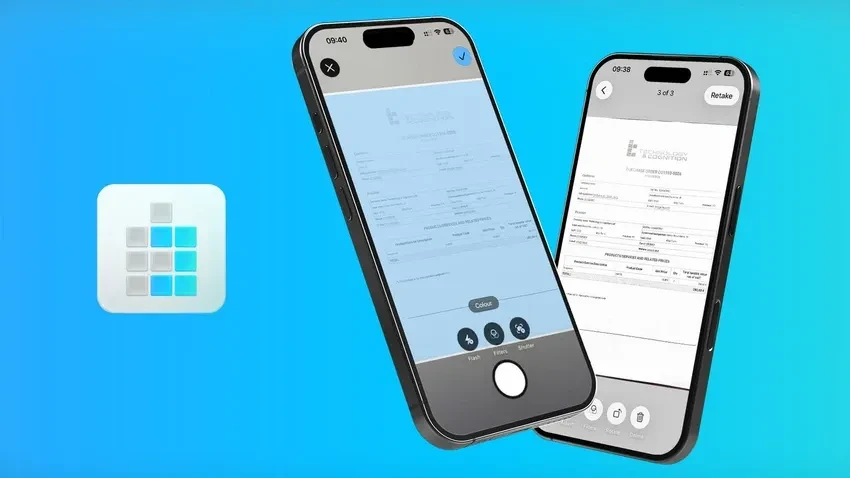
AIDA Mobile, the app that brings AIDA's agentic document management to your smartphone, is now available for Android on Google Play, starting with version 7.0.6. Your work documents enter AIDA from wherever you are, and you can follow them all the way to the archive, with the same features as the iPhone and iPad app.
When we introduced AIDA Mobile 7.0, we asked Android users to stay tuned. Now it's here: your whole team can use the same app, whatever phone they carry.
Why bring agentic document management to Android?
Because documents reach people who work away from the office, and in many teams those people carry an Android phone. As long as the app existed only for iPhone, those colleagues were left out of the workflow.
Take an installation company. The technician wraps up the job at the customer's site with the signed service report and the delivery note for the materials. If they have an iPhone, they scan everything with AIDA Mobile and the document is already being analyzed before they get back in the van. If they have an Android phone, until now they took a photo and sent it to the office by email or chat, where someone downloaded it, straightened it and uploaded it to AIDA by hand.
Many teams have accepted this two-track process as normal: the same document takes two different routes depending on the phone of whoever receives it. With AIDA Mobile for Android, the second route disappears. This applies to the sales agent with signed orders, to whoever receives goods in the warehouse, to the site manager and to anyone returning from a business trip with expense receipts.
What can you do with AIDA Mobile on Android?
The same things you do with the iPhone and iPad app. AIDA Mobile works on the same account, with the same document types and the same data extraction as AIDA on the web, so you can start on your smartphone and finish at your desk, or the other way around.
Scan documents with your Android smartphone
A photo taken with your phone isn't a document yet: it comes out crooked, with shadows and the edge of the desk. AIDA Mobile's built-in scanner detects the page, crops it and corrects its perspective, just as a flatbed scanner would. Capture several pages in a row into a single PDF and choose the filter that makes it most readable. You can also upload PDFs and images you already have on your phone, from your files or your gallery.
After scanning, choose the document type, for example supplier invoices or delivery notes, and AIDA does the rest. AIDA is an Intelligent Document Processing (IDP) platform, and it goes beyond OCR: OCR turns the image into text, handwriting included, while AIDA understands what kind of document it is and extracts the data you need. It recognizes dates, VAT numbers, IBANs and company names without training, and with AIDA Boost it also extracts your company's specific information from the very first document.
Review and approve extracted data from your phone
In the Analysis section you see the document next to the extracted properties, with a bar showing how many are still missing before approval. If a value is wrong or missing, you correct it by tapping it directly on the page: it's the same one-tap correction as AIDA on the web, designed for a smartphone screen, and AIDA applies it to subsequent documents.
When everything is ready, you approve the document and AIDA sends it to the configured destinations, such as a folder in Google Drive or SharePoint. After approval you can also choose to automate similar documents: when confidence is high enough, AIDA approves and sends them on its own, leaving you only the exceptions. This is straight-through processing (STP), where the document moves from capture to archive without anyone having to step in.
Browse the document archive on your smartphone
On your phone you have the entire AIDA document archive, including documents that arrived from the web, email or other input channels. Storage is unlimited on every plan.
Search finds documents both in their text and in the extracted data: type an invoice number or a supplier name and open the document with its pages and properties. From there you can share it in a couple of taps, for example with a customer who asks for it during a visit.
How is AIDA Mobile different from a regular scanner app?
A regular scanner app produces a clean PDF and stops there. AIDA Mobile sends the document to AIDA, which extracts its data, has it reviewed and files it in the right place.
| Feature | Generic scanner app | AIDA Mobile |
|---|---|---|
| Cropping and perspective correction | Yes | Yes |
| Text recognition (OCR) | Often | Yes, handwriting included |
| Data extraction (supplier, dates, amounts) | No | Yes, without training |
| Data review and approval | No | Yes, with one-tap correction |
| Delivery to business systems | Manual, by email or sharing | Automatic, to the configured destinations |
| Archive with search across extracted data | No | Yes, unlimited on every plan |
| Data ready for AI agents | No | Yes, verified and linked to other documents |
If someone on your team already uses a scanner app to send PDFs to the office, AIDA Mobile takes its place and also removes the next step: no one has to open the email, download the attachment and upload it again.
How do AI agents work on documents captured with AIDA Mobile?
Every document captured and approved with AIDA Mobile immediately becomes correct, certified context for AIDA's AI agents. AIDA GPT and Actio don't have to guess what's in a photo or a PDF: they work on documents that are already classified, with extracted and verified data, duplicates flagged and relationships to the other documents in the archive.
Back to the technician in our example. The delivery note they scanned at the customer's site and approved from their phone is immediately available to AIDA GPT: someone at the office can ask how much material was delivered to that customer in the last quarter and get an exact total, calculated across all the documents in the archive rather than estimated by the language model. Actio can then draft the email to the customer with a delivery summary, and it asks a person to confirm before sending it.
Agents are only as useful as the data they work on: with AIDA Mobile, that data enters AIDA the moment the document arrives, not days later. We explain how AIDA's agents work on the archive in our article on AI agents that already know your company's documents.
How will AIDA Mobile for Android be updated?
Just like the iPhone and iPad app: with regular updates. The Android version is built on the same foundation as the iOS app, rebuilt with AIDA Mobile 7.0, which is why the two apps offer the same features.
We have plenty of new features in store for AIDA Mobile, and they'll come to Android just as they do to iPhone and iPad. Android users will no longer have to wait for a dedicated version.
How to get started with AIDA Mobile on Android
It only takes a few minutes: download the app, sign in and scan your first document.
- Download AIDA Mobile from Google Play, or search for it by name in the store.
- Sign in with the same account you use for AIDA on the web. If you don't have an account yet, you can start with the Starter plan, free forever.
- Open Analysis, tap the + button and choose the scanner, or upload a file or photo from your phone.
- Select the document type, for example supplier invoices, and confirm the upload.
- When the analysis is ready, check the extracted properties, correct any that need it and approve the document.
Document types and destinations are set up in AIDA web, by selecting and connecting options in the interface, with no coding. The app uses them as they are, so there's nothing to configure on your phone.
Frequently asked questions about AIDA Mobile for Android
Is AIDA Mobile for Android free?
Yes, the app is a free download from Google Play. To use it you need an AIDA account: the Starter plan is free forever, and you'll find the paid plans on the AIDA pricing page.
Do documents scanned on Android also show up in AIDA web?
Yes. The app and the web use the same account and the same archive: a document scanned on the job site is already in Analysis on the office PC, and one uploaded from the web also opens on your phone.
What's the difference between AIDA Mobile for Android and for iPhone?
In terms of features, none: the scanner, Analysis, approval and Archive all work the same way. So you can roll out AIDA Mobile to your whole team, regardless of which phone each person uses.
Which documents can I scan with AIDA Mobile?
Any paper business document: invoices, delivery notes, receipts, contracts, orders and service reports. AIDA recognizes text even when it's handwritten.
Download AIDA Mobile from Google Play and discover all its features on the AIDA Mobile page. If you'd like to see how it fits into your company's document workflows, book an AIDA demo with our team.